Simple Form Helper
As I continue to use JQuery and MVC I am completely impressed with how much you can do with very little. I know the new preview 4 came out with an AjaxForm helper. I could not resist, so I made my own and added it to the whole controls project I've been working on. (I have not forgot about the grid, but I've gotten a little bored of it for the time being although I do want to finish it...). So here is the idea:
- Have complete control over HOW the form is rendered
- Be VERY light (I attached the whole thing to the onSubmit attribute on the form)
- Make it fast (it took me like a half an hour or so)
Using it
I found this nifty way of using an action delegate that "reads between the lines." The motivation came from the MVCContrib grids ability to completely define inline ASP.NET looking code and pass it into the helper. Here is how you use it (for some reason I find it useful to see how it works first, and then explain how it works):
<% Html.JQueryForm("studentForm",
      c => c.EditStudent(),
      (ViewData.Model as IEnumerable).First(),
      s =>
      { %>
          <%= Html.TextBox("Id", s.Id.ToString()) %>
          <%= Html.TextBox("FirstName", s.FirstName) %>
          <%= Html.TextBox("LastName", s.LastName) %>
          <%= Html.SubmitButton("Submit", "Submit") %>
    <% }
   );
%>
Parameter explanation:
- The name to give the form
- The action that should be invoked on the controller
- The POCO object that holds the data
- What to render (the Action delegate that says take a student S and make Html textboxes)
The types passed in are the POCO data object and the controller that will get the action.
Building it
I really just copied a lot of what I have already done with the grid (see previous posts) and made it more lightweight. First the helper:
public static void JQueryForm<T, TController>(this HtmlHelper helper,
	string name, Expression<Action<TController>> editAction,
	T data,
	Action<T> block)
	where T : class
	where TController : Controller
{
	Form f = new Form(name, helper.BuildUrlFromExpression<TController>(editAction),
		helper.ViewContext.HttpContext);
	f.RenderOpen();
	block.Invoke(data);
	f.RenderClose();
}
Notice how simple it really is! Using the helper, I build a url from the controller expression, and then pass everything else into a Form object that only does 2 things: render the opening form tag, and render the closing form tag. The only catch is rendering the correct JavaScript code in the onSubmit attribute of the form tag. The rest was simple. Notice on line 4 above the delegate that takes the markup. This markup is rendered on line 11. For the "hard" part, I just copied the JQuery Ajax call from the Grid Control I have been working on. Here is the gist of it:
var formData = $(this).serializeArray();
$.ajax({
     type : 'POST',
     contentType : 'application/x-www-form-urlencoded',
     url : 'edit ACTION here',
     data : formData,
     dataType : 'json',
     success : function(msg){
         alert('Complete! ('+msg+')');
     }
});
return false;
The return false is there to prevent the form from posting back.
Screenshot
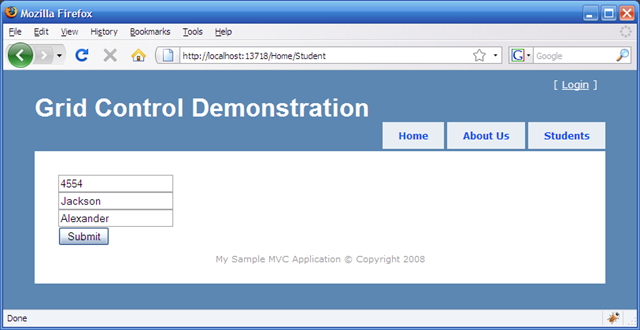
Here are some screenshots of the whole thing:
The form rendered:
The postback:
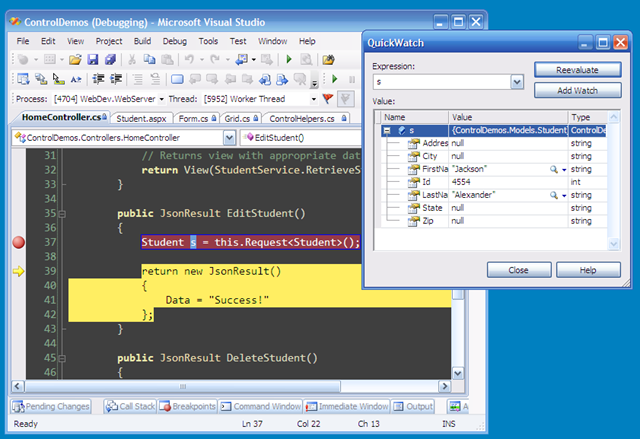
Notice that I used the Request helper I built in a previous post. In order to do this, I am required to name the textboxes with the same name as the property of the object. This is how the helper resolves that appropriate attribute.
Comments
Related Posts
Creating Advanced ASP.NET MVC Controls (Part 3, A Scheduler)
Purpose This is part 3 of a series going through the process of creating an advanced control for the ASP.NET MVC system. I've decided to create a schedule control that allows a user to schedule and item on a calendar control as well as add some…
Creating Advanced ASP.NET MVC Controls (Part 2, Finished Debugger)
Purpose As mentioned in the previous post, in order to create good client side controls that interact well with the ASP.NET MVC system, we need to have a way to visualize data that the control either generates, or passes to the controllers. I found…
Ajax HTML Grid Control for ASP.NET MVC (Part 3)
Moving to an HTML Helper As I was looking around at the various HTML helpers out there, I realized that I should probably conform and stick to what is being done. Having said that, I refactored the Grid class to be a new HTML helper. Here is how it…