Moving away from ASP 3.0 Request.Form(" ...
As mentioned in my previous post, I wanted to find a way to auto-populate and entity object from the Request.Form collection. I also wanted (as an aside) to see if the grid still worked on MVC Preview 4 (it does). Here is the code:
public static T Request<T>(this Controller controller) where T : class, new()
{
    T o = new T();
    var request = controller.Request;
    foreach (var property in typeof(T).GetProperties())
    {
        // Check if the object has the appropriate property
        var q = (request.Form.AllKeys
            .Where<string>(s => s.ToLower() == property.Name.ToLower()))
            .ToList<string>();

        // if more than one... ignore
        if(q.Count == 1)
        {
             string datum = request.Form[q[0]];
             if (property.PropertyType == typeof(string))
                 property.SetValue(o, datum, null);
             else
                 property.SetValue(o,
                    Convert.ChangeType(datum, property.PropertyType),
                    null);
         }
    }

    return o;
}
Notice that this is not an extension on the HtmlHelper since this will only be used inside the controller (hence a controller extension method). Here is how it is used:
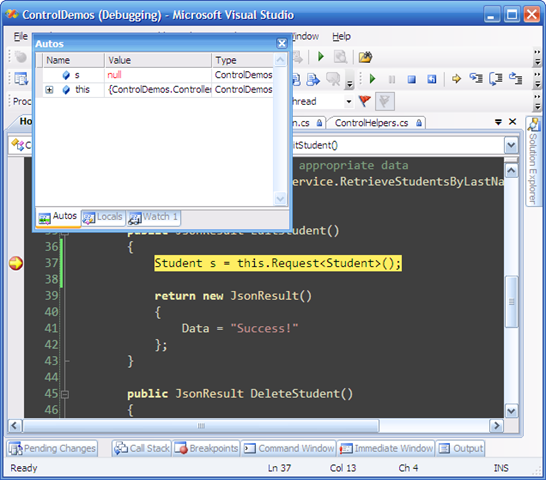
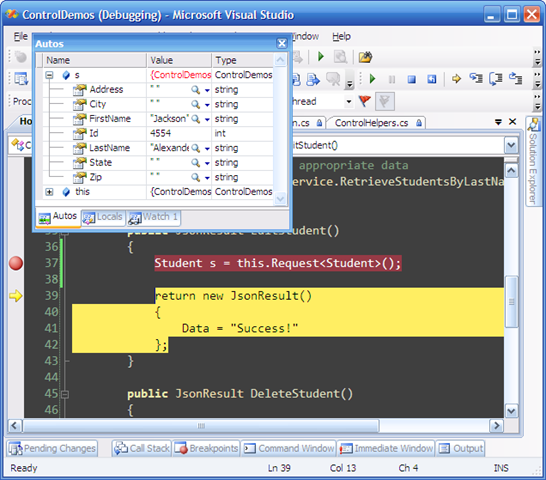
Student s = this.Request<Student>();Now for the explanation! The constraints on T (line 1, the where part) say that T must be a reference type and have a parameter-less constructor. I guess it doesn't have to have a parameter-less constructor but I thought it would be a pain to find out which request key matched up with which parameter in the constructor. I also thought that Entity classes should be POCO objects so they would naturally have an empty constructor. Some screenshots:
Before:
After:
The Grid
I am continuing to work on the grid (this was a part of it). I just haven't gotten around to implementing the next thing all the way. The goal again was to have more control over how the grid should be rendered. I am borrowing some of the ideas from the MVCContrib grid but simplifying it a whole lot (for simple users like myself)
MVC Preview 4
I uninstalled preview 3 and then installed preview 4 and shortly after found that VS could not open my preview 3 stuff. Instead of rigging it, I just re-created the MVC part. The Controls assembly (the one with the grid) worked perfectly after correcting the references to the MVC dll's.
Comments
Related Posts
Creating Advanced ASP.NET MVC Controls (Part 3, A Scheduler)
Purpose This is part 3 of a series going through the process of creating an advanced control for the ASP.NET MVC system. I've decided to create a schedule control that allows a user to schedule and item on a calendar control as well as add some…
Creating Advanced ASP.NET MVC Controls (Part 2, Finished Debugger)
Purpose As mentioned in the previous post, in order to create good client side controls that interact well with the ASP.NET MVC system, we need to have a way to visualize data that the control either generates, or passes to the controllers. I found…
Creating Advanced ASP.NET MVC Controls (Part 1, A Debugger)
Purpose In previous posts, I started creating an html grid helper that was really just an experiment to see how one would accomplish such a thing. Here, I wanted to delve into a more generic approach to creating html controls for the ASP.NET MVC…